Register your business and go live
Create your booking page in three steps and pay for as many months as you want by M-Pesa.
-
1
Business details
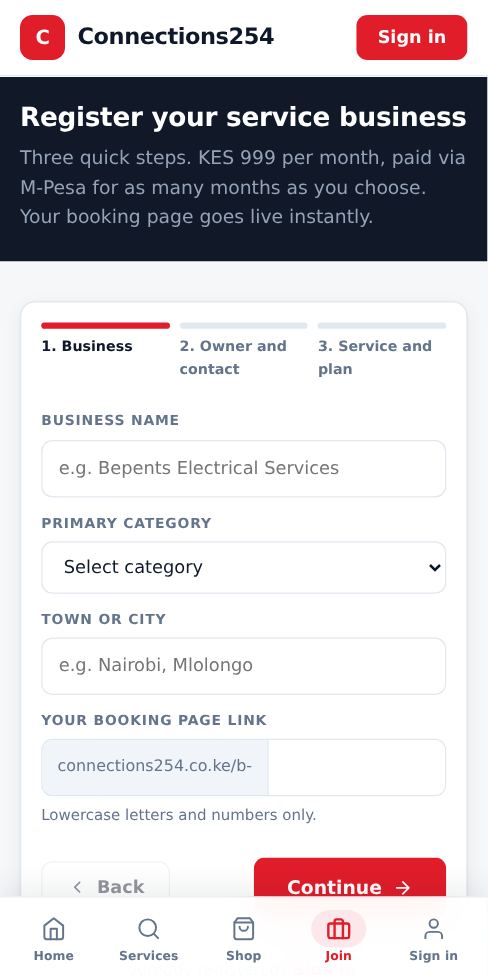
Tap For businesses or Join, then Register. Enter your business name, category and town. Choose your page link, for example connections254.co.ke/b-yourname. Use lowercase letters and numbers only.
-
2
Owner and contact
Enter the owner name, email and the M-Pesa phone number. Your sign-in details and alerts go to this email and phone.
-
3
First service and plan
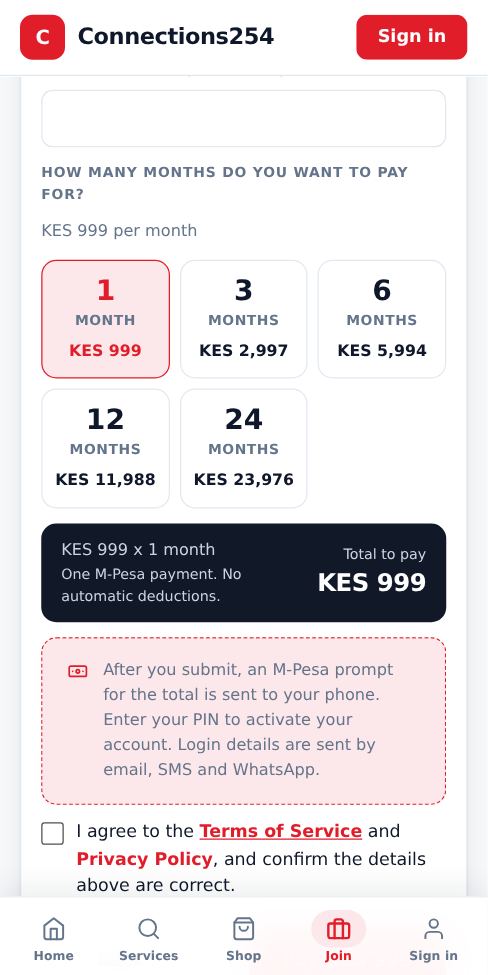
Add your first service (you can add more later). Choose how many months to pay for: 1, 3, 6, 12 or 24. The total is calculated for you at KES 999 per month. Tick that you agree to the Terms and Privacy Policy.
-
4
Pay by M-Pesa
Tap Pay. An M-Pesa prompt appears on the phone number you entered. Enter your M-Pesa PIN. The page confirms automatically when the payment goes through, then shows your sign-in details.
-
5
Share your page
Your page is live immediately. Copy the link from the top of your dashboard and share it on WhatsApp, Instagram and your Google profile.
- If the M-Pesa prompt does not appear, check the phone is on and has network, then tap Send M-Pesa request again on the payment page.
- Already signed in? Registration asks you first whether to continue to your dashboard or sign out and register a different business.
More guides for business owners
Did this answer your question?
If not, contact our support team. WhatsApp is the fastest.