Contact Connections254 support
Reach our team on WhatsApp, by phone, SMS or email, or send a request from any page.
-
1
Tap Help on any page
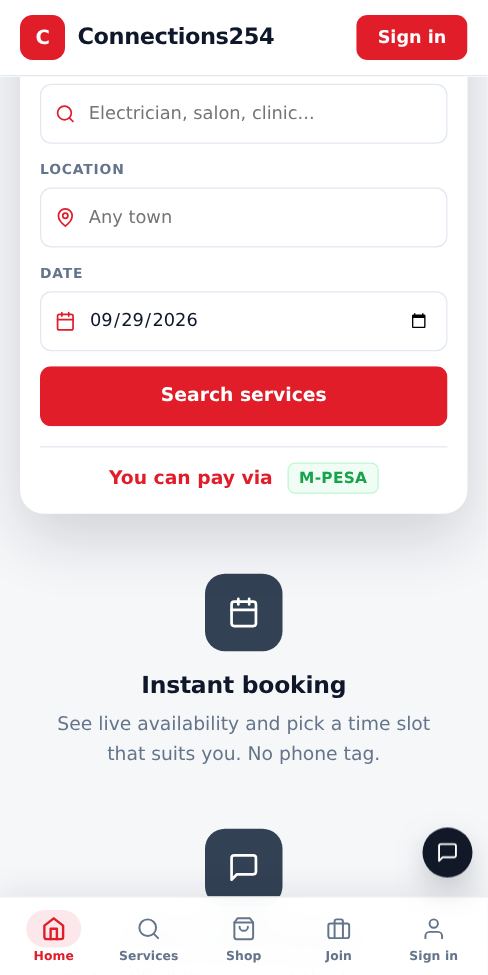
The round Help button sits at the bottom right of every page, above the bottom menu on phones. In your dashboard you can also tap Contact support in the side menu.
-
2
Pick how to reach us
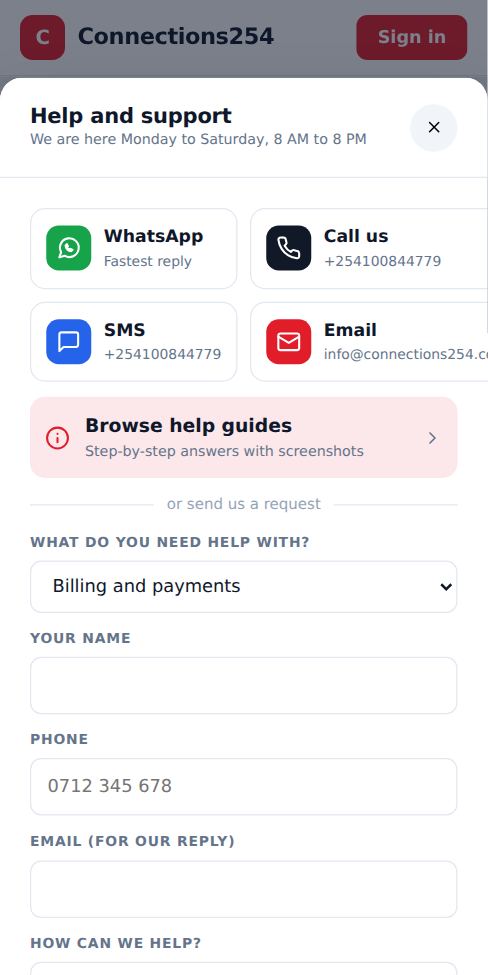
WhatsApp opens a chat with +254100844779. Call and SMS use the same number. Email goes to info@connections254.co.ke.
-
3
Or send a request
Choose a topic such as Billing and payments, Account and sign-in or Bookings, add your contact details and describe the problem. Include a booking reference, receipt number or M-Pesa code if it is about a payment.
-
4
Keep your reference number
You get a reference like SR1A2B3C on screen and by email or SMS. Our team is alerted immediately and replies by WhatsApp, phone or email.
- If you are signed in, your request is linked to your business automatically so we can find it faster.
More guides for customers
Did this answer your question?
If not, contact our support team. WhatsApp is the fastest.