Install the Connections254 app on your phone or computer
Add Connections254 to your home screen. It opens full screen like an app and keeps you signed in.
3 steps · about 1 minute
-
1
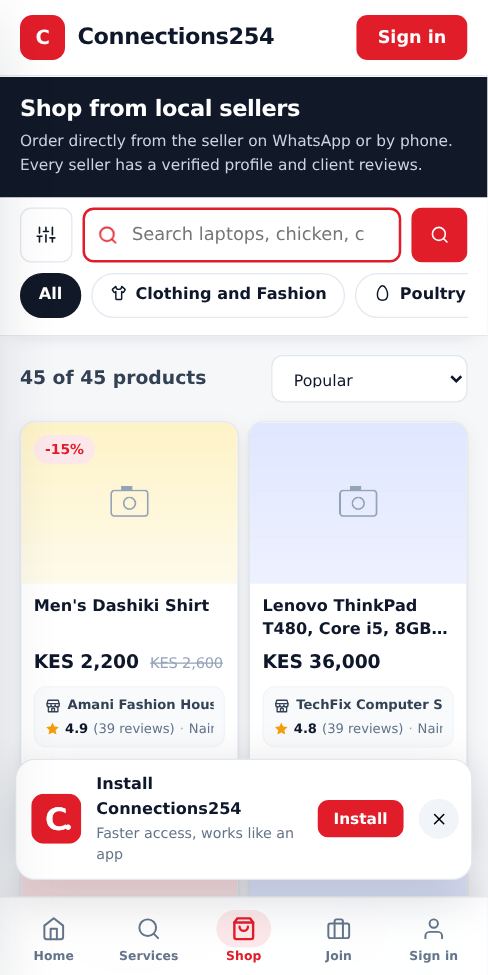
Tap Install when it pops up
After a few seconds a small Install bar appears at the bottom. On Android, Chrome and Edge, tapping Install adds the app in one step. You can also tap Install the app at the bottom of any page.
-
2
iPhone and iPad
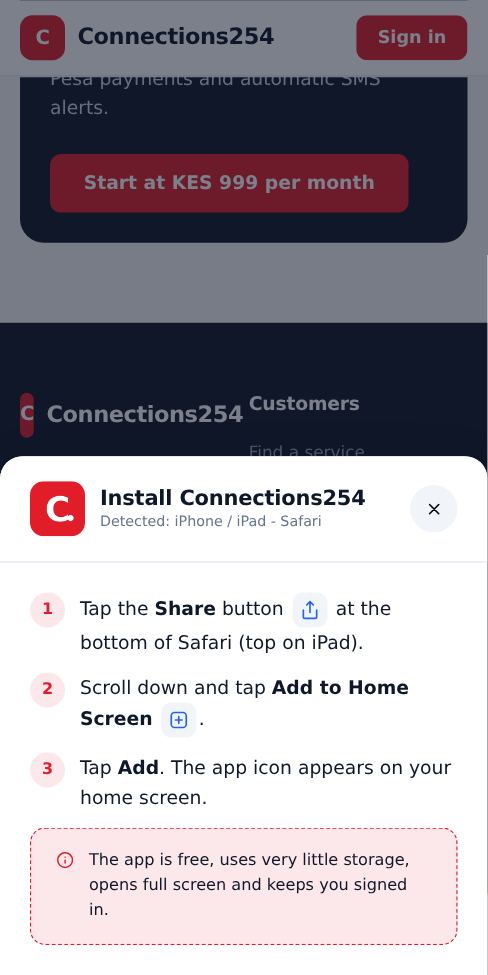
Apple does not allow automatic installs. Open the site in Safari, tap the Share button, scroll down, tap Add to Home Screen, then Add. The steps are shown on screen for your device.
-
3
Computer
In Chrome or Edge, click the install icon at the right end of the address bar, or open the browser menu and choose Install. On a Mac with Safari, use File, then Add to Dock.
Good to know
- The app is free and uses very little storage.
- If you tapped the X on the Install bar, it stays hidden for 7 days. Use the Install the app link at the bottom of the page instead.
More guides for customers
How to book a service
Find a business, pick a time that suits you and send your booking in under a minute.
How to order a product from the Shop
Browse products from local sellers and order directly on WhatsApp, by phone or with a call-back request.
Contact Connections254 support
Reach our team on WhatsApp, by phone, SMS or email, or send a request from any page.
How to check that a business or seller is genuine
Use ratings, verified reviews, completed jobs and official social pages before you book or buy.
How to write or edit a review
Share your experience with a service. Reviews help other customers choose well.
Did this answer your question?
If not, contact our support team. WhatsApp is the fastest.