Customers list and shoutouts
See new, returning and inactive customers and thank them with a shareable shoutout.
2 steps · about 1 minute
-
1
Open Customers and Shoutout
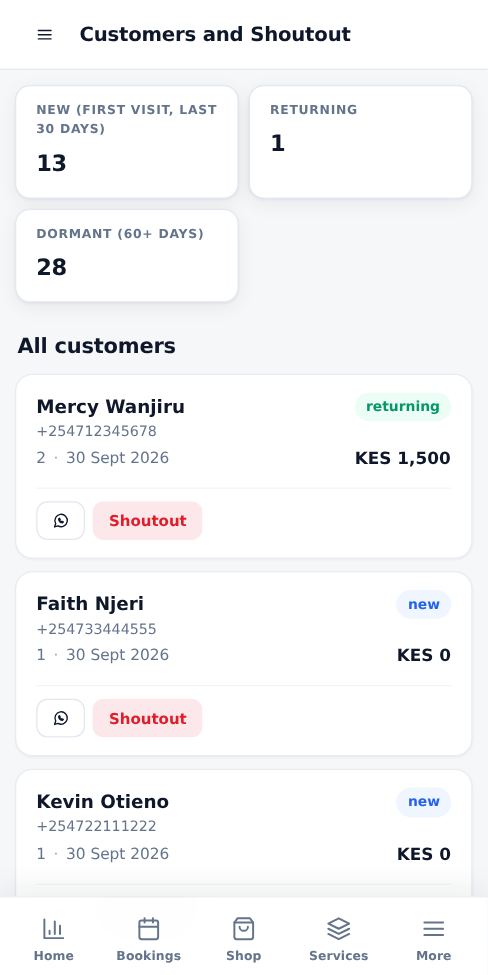
Customers appear after their first booking, with visits, last visit and total spent. You can message them on WhatsApp in one tap.
-
2
Create a shoutout
Tap Shoutout to create a thank-you card to post on your WhatsApp Status or Instagram.
Good to know
- Always ask customers before featuring them publicly.
More guides for business owners
Register your business and go live
Create your booking page in three steps and pay for as many months as you want by M-Pesa.
Signing in, security codes and one account per browser
How sign-in works, what the security code is, and how to switch accounts safely.
Run several businesses from one account
Add another business, for example electrical and hardware, and switch between them with one sign-in.
Set up your public page, hours and social links
Add your logo, description, working hours, booking rules and social media so customers trust you.
Add and price your services
List what customers can book, how long each job takes and what it costs.
Accept, complete and manage bookings
Respond to new requests, assign staff and mark jobs complete so your calendar stays accurate.
Did this answer your question?
If not, contact our support team. WhatsApp is the fastest.